
📑 Jump to Section (Table of Contents)▼
Introduction: Accessing Your L1 Account
Whether you are a seasoned player looking to spin the reels on JILI slots or a newcomer eager to test the multiplier mechanics of L1 Aviator, establishing and securing your user account on L1 (also operating as L1.GAME) is your very first milestone.
Creating an authenticated profile on L1-in.com does more than simply grant lobby access—it entitles every eligible new user to an immediate ₹200 Free Welcome Bonus Chest, unlocks access to our multi-tiered L1 affiliate program, and connects your account directly to our lightning-fast UPI and IMPS withdrawal gateway.
In this comprehensive guide, we provide an exhaustive breakdown of the L1 login and registration workflow, detail security best practices for two-factor verification, and explain how to troubleshoot common credential hurdles.
Prerequisites Before Registering on L1
To ensure your account is approved immediately and remains fully compliant for instant withdrawals later on, please ensure you have the following ready before initiating sign-up:
- Active Indian Mobile Number (+91): Required for real-time SMS one-time-password (OTP) verification and transaction confirmation.
- Android or iOS Smartphone: Equipped with either the official L1 APK or Safari browser for iOS PWA access.
- Age Verification (18+ Requirement): Real-money gaming is restricted strictly to legal adults. Review our responsible gaming guidelines before registering.
- Valid UPI ID or Bank Account: Needed later to withdraw your winnings as explained in our how to play and deposit tutorial.
Step-by-Step L1 Registration Walkthrough
Follow these verified steps to create your account and guarantee eligibility for the promotional sign-up reward:
Step 1: Launch the Application or Web Client
Open the L1 application downloaded from our official APK installation guide. Alternatively, navigate to the web client via L1-in.com.
Step 2: Locate the Sign-Up Button
On the top header bar of the screen, tap the prominent yellow Sign Up button positioned adjacent to the purple Sign In button (as visible in our official screenshot gallery).
Step 3: Enter Your Credentials
Fill in the concise registration form:
- Mobile Number: Enter your 10-digit Indian telephone number.
- Login Password: Formulate a strong password containing at least 6 to 16 characters, blending uppercase letters, lowercase letters, and digits.
- Confirm Password: Re-enter your password to prevent typographical errors.
- Invitation / Referral Code: If you were introduced by a friend or affiliate partner, insert their code here. This automatically tags you for the ₹2,000 friend invite rewards and 1% bet rebates.
Step 4: OTP Verification
Tap Send OTP. Within 15 to 30 seconds, a 6-digit numeric verification token will arrive via SMS. Input the code into the verification field and tap Confirm Registration.
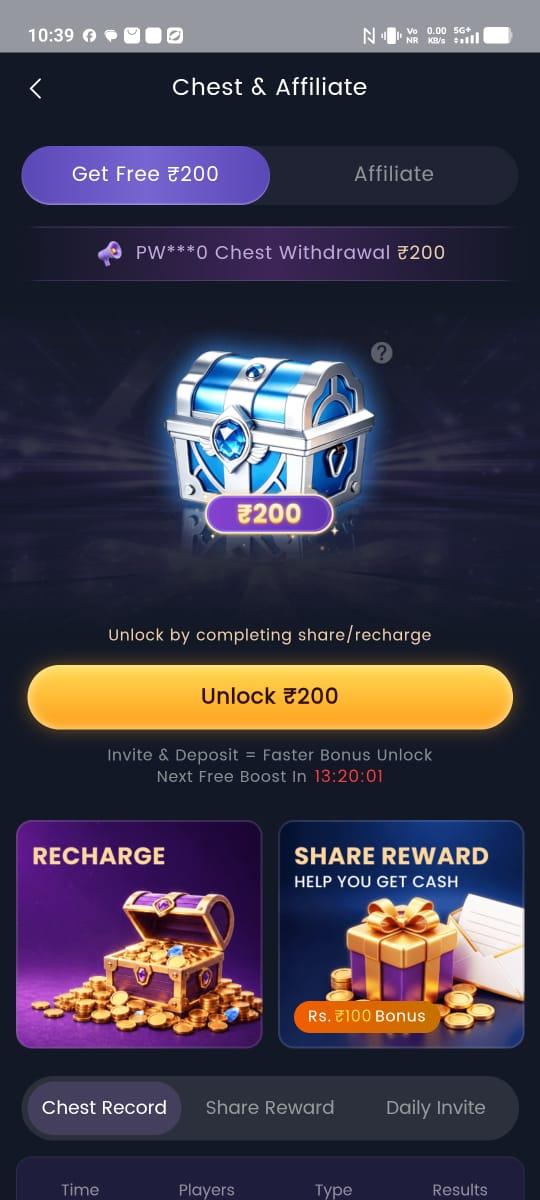
Step 5: Claim Your ₹200 Free Bonus Chest
Upon successful account creation, a celebratory popup will announce your eligibility for the welcome gift. Tap Claim Now, or navigate to the Chest tab in the bottom navigation bar. Open the glowing blue-and-silver chest to credit ₹200 directly to your bonus balance! For turnover requirements, consult our bonuses and promotional terms.
Comprehensive OTP Troubleshooting by Indian Telecom Operator
One-time-passwords (OTPs) are delivered over high-priority transactional SMS routes. If you encounter a delay receiving your code, refer to these telecom-specific solutions:
1. Reliance Jio Users
- Potential Issue: Jio's automated DND (Do Not Disturb) filter may divert transactional SMS into a spam folder.
- Fix: Open the MyJio App > Settings > Do Not Disturb (DND). Ensure transactional communications from commercial service providers are permitted. Alternatively, toggle Airplane Mode ON for 10 seconds and OFF to force cell tower reconnection.
2. Bharti Airtel Users
- Potential Issue: SMS inbox storage full or network latency in remote roaming circles.
- Fix: Clear older SMS verification codes from your device inbox. If the timer elapses, wait for the 60-second cooldown on the L1 login screen and tap Resend OTP.
3. Vodafone Idea (Vi) Users
- Potential Issue: SMS shortcode filtering on prepaid numbers with expired validity packs.
- Fix: Verify that your Vi number has an active validity recharge capable of receiving incoming SMS.
4. BSNL Mobile Users
- Potential Issue: Higher routing latency on legacy 2G/3G towers.
- Fix: Request the OTP while connected to a stable Wi-Fi network with VoWiFi enabled, or wait 45 to 60 seconds before requesting a secondary dispatch.
Understanding App Permissions: Total Privacy Breakdown
Unlike shady third-party betting apps that ask for your contacts, camera, or call logs, the authentic L1 APK adheres to strict data minimization principles:
| Android Permission Requested | Technical Purpose on L1 | Why It Is Safe |
|---|---|---|
| INTERNET (Network Access) | Establishes encrypted WebSocket connection to game servers and live dealers | Essential for low-latency Aviator multiplayer |
| ACCESS_NETWORK_STATE | Monitors cellular / Wi-Fi handover to avoid round disconnection | Prevents game lag during transit |
| VIBRATE | Provides tactile feedback when Aviator auto-cashout executes | Can be toggled off in settings |
| WAKE_LOCK | Prevents screen sleep while watching active live casino tables | Standard for video streaming apps |
| CONTACTS / SMS (NOT Requested) | NEVER REQUESTED BY OFFICIAL L1 | Guarantees complete personal privacy |
| STORAGE / PHOTOS (NOT Requested) | Only accessed if you voluntarily upload a KYC document | Never accesses personal photo galleries |
How to Perform a Routine L1 Login
Once registered, logging back into your account takes mere seconds:
- Launch the L1 app or visit our login portal.
- Tap the purple Sign In button at the top of the interface.
- Enter your registered mobile number and your password.
- Tap Log In.
- *Optional Tip:* If your smartphone supports biometric authentication (Fingerprint or Face Unlock), you can enable one-tap biometric sign-in within Menu > Security Settings.
Biometric Login Setup: Fast Fingerprint & Face Recognition
Modern Android and iOS smartphones allow you to bypass manual password entry entirely:
- Log into L1 using your mobile number and password.
- Tap Menu (bottom left) > Security & Privacy.
- Toggle the switch next to Enable Biometric Quick Sign-In.
- Authenticate using your smartphone's physical fingerprint sensor or Apple Face ID.
- On all future sessions, launching the app will display a seamless biometric prompt, letting you enter the lobby in under 1 second!
Password Recovery: What to Do If You Forgot Your Password
If you cannot recall your credentials, do not create a duplicate account! Holding multiple accounts under the same IP address or phone number violates our fair-play policies and can lock your funds. Instead, use the automated password reset mechanism:
- On the L1 login screen, tap Forgot Password? located below the password entry field.
- Enter your registered 10-digit mobile number.
- Tap Request OTP.
- Input the 6-digit verification code received on your smartphone.
- Create and confirm a brand-new, secure password.
- Tap Update Password to immediately regain access to your dashboard and existing wallet balance.
If you no longer have access to your registered SIM card, reach out immediately to our 24/7 customer care team via contact support or message our official channel on Telegram.
Advanced Account Security: Anti-Phishing & Social Engineering Defense
In India's digital payment ecosystem, fraudsters frequently pose as platform representatives. Protect your wallet by reviewing this safety table:
| Fraudulent Scenario | How the Scammer Operates | How L1 Protects You | Correct User Action |
|---|---|---|---|
| Fake WhatsApp Admin | Messages you claiming you won ₹50,000 but must pay ₹500 "tax" | L1 never asks for upfront clearance fees | Block and report immediately |
| Phishing Login Portals | Clones the L1 login page on lookalike domains | Official portal is strictly hosted on L1-in.com | Always verify the browser URL |
| Fake Telegram Predictors | Sells "Aviator Signal Bots" requiring your login password | Provably Fair seeds make prediction impossible | Never reveal account passwords |
| Fake Customer Care Numbers | Listed on Google Maps with private mobile numbers | Official support operates exclusively in-app and on Telegram | Contact only via our contact page |
Why Duplicate Accounts Are Strictly Prohibited
A frequent error made by novice players is attempting to register multiple profiles to harvest several ₹200 welcome chest bonuses. Here is why this is a fatal mistake:
- Hardware Fingerprinting: The L1 client logs unique device hardware IDs, MAC addresses, and IMEI signatures.
- Network Association: Accounts operating from identical Wi-Fi IP ranges sharing banking destinations are flagged automatically by our anti-fraud engine.
- Penalty Enforcement: Duplicate accounts result in immediate freezing of all balances, cancellation of pending UPI withdrawals, and permanent blacklisting of associated telephone numbers under our terms of service.
- Play cleanly on a single account to preserve your VIP status and maintain smooth daily cashouts!
Top Security Measures to Protect Your L1 Account
Because your L1 profile holds real rupee balances and links to your personal banking credentials, practicing diligent account security is paramount:
- Never Share OTPs: L1 customer support executives will *never* ask you for your account password or SMS OTPs over phone calls, Telegram, or WhatsApp.
- Avoid Public Wi-Fi Networks: Refrain from accessing your account or processing withdrawals over unsecured public cafe or airport Wi-Fi networks.
- Regular Password Rotation: Update your password every 60 to 90 days to defend against credential-stuffing exploits.
- Bind Your Bank Account Promptly: Binding your personal UPI handle or savings bank account early prevents unauthorized parties from diverting funds in the unlikely event your phone is misplaced.
Exploring Games Post-Login: Where to Begin?
Now that your account is active and loaded with the ₹200 welcome bonus, what should you play first?
- For Thrill-Seekers: Head straight to Spribe's L1 Aviator. Learn disciplined cashout tactics with our Aviator game winning tricks guide.
- For High Return-to-Player (RTP) Seekers: Spin the reels on JILI classics like *Fortune Gems 3* and *Fortune Garuda 500*. Check our analytical review of the top 10 high RTP games on L1.
- For Live Casino Enthusiasts: Experience authentic live gaming with *Super Andar Bahar* and *Hindi Roulette* featuring native Indian game hosts.
- For Strategic Investors: Transition into an entrepreneurial affiliate by building your player network through our L1 affiliate earning blueprint.
First-Day Action Plan: Maximizing Your Starting Capital
To help you get the most out of your first 24 hours on the platform, our editorial team has assembled this strategic checklist:
- Step 1: Download the verified package from our L1 APK download portal.
- Step 2: Complete registration and verify your SMS OTP.
- Step 3: Open the Chest tab to credit the ₹200 free sign-up reward.
- Step 4: Place conservative bets (₹10 - ₹20) on high RTP titles like *7Up 7Down* or *Aviator* (with auto-cashout at 1.30x) to test mechanics.
- Step 5: Bind your UPI handle under Wallet > Bind Account so you are prepared for instant payouts.
- Step 6: Review our responsible gaming policies to ensure your play remains balanced and enjoyable.
Comprehensive Account Security Audit & Verification Checklist
To guarantee that your profile remains immune to unauthorized access and ready for high-volume withdrawals at any moment, verify that you satisfy our 7-point security checklist:
- Unique Passwords Only: Never reuse passwords utilized on personal email, banking portals, or social media networks.
- Device Level Biometrics Enabled: Secure the L1 app with fingerprint or Face Unlock directly within the in-app security menu.
- SMS OTP Secrecy: Memorize that L1 support personnel will NEVER request your OTP or SMS verification code under any circumstances.
- Verified Bank Account Binding: Link your personal receiving bank account immediately after logging in, prior to initiating gameplay.
- Single Mobile Device Pairing: Avoid logging in across public, shared, or borrowed smartphones.
- Avoid Third-Party 'Predictor' Tools: Never enter your account phone number or credentials into external 'Aviator Hack' or 'Signal Bot' applications.
- Periodic Password Rotation: Update your password every 60 to 90 days following our account security protocol.
What to Do If Your Account Is Flagged for Review
In rare situations where a player logs in from an unfamiliar geographic region or connects through a public proxy, the platform's automated fraud detection system may place a temporary security hold on the profile. Here is the verified procedure to restore instant access:
- Do Not Create a Duplicate Profile: Attempting to register another account will worsen the hold and trigger automatic multi-accounting penalties under our terms of service.
- Verify Mobile Ownership: Request an automated SMS re-authentication token directly through the login interface.
- Contact 24/7 Live Support: If the hold persists, open our contact support portal or message our official admin channel on Telegram. Provide your registered mobile number and your latest deposit UTR transaction receipt to confirm legal ownership. Customer care will typically unfreeze your profile within 15 to 30 minutes!
Summary & Quick Links
Authentication on L1 is engineered to be swift, friction-free, and fortified by banking-grade encryption. If you have not yet installed the mobile client, grab the certified package on our L1 APK download page, register in under 60 seconds, and collect your ₹200 free bonus chest immediately!
Download L1 APK (v5.2.4)
Claim your instant ₹200 free signup chest and experience the lowest latency crash and slot games in India.
Frequently Asked Questions
Q1.Can I register on L1 without an Indian mobile number?
Currently, L1 requires a valid 10-digit Indian mobile number (+91) to facilitate real-time SMS OTP verification and ensure compliance with regional payout processors.
Q2.How do I claim the ₹200 welcome bonus after logging in?
Navigate to the 'Chest' icon on the bottom navigation bar. Tap 'Unlock ₹200' to open your promotional gift chest and credit the funds to your account.
Q3.What should I do if the SMS OTP does not arrive?
Wait for the 60-second cooldown timer to finish and tap 'Resend OTP'. Ensure your phone has stable network reception and is not filtering commercial SMS messages.
Q4.Can I create multiple accounts on L1?
No. L1 strictly enforces a one-account-per-player policy based on device ID, IP address, and mobile number. Duplicate accounts risk forfeiture of bonus balances.
Q5.Is my personal data and password safe on L1?
Yes. All login sessions and data transmissions are encrypted utilizing industry-standard 256-bit SSL protocols, safeguarding your credentials against unauthorized interception.
Specializing in Provably Fair gaming algorithms, Return to Player (RTP) mathematics, and mobile gaming security across India's real-money entertainment ecosystem.